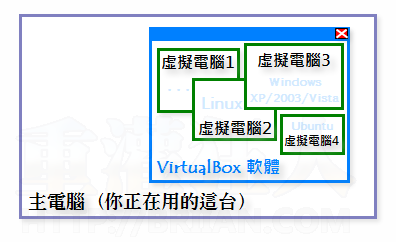
一般來說,要安裝 VirtualBox 的主電腦,記憶體至少需 512MB 以上可用空間,記憶體越多越好。電腦硬體配備的等級也盡量要好一點,這樣虛擬電腦跑起來才會比較順。目前VirtualBox 提供了各種作業系統的版本,除了支援一般的 Windows XP/Vista/7/8/10 之外,還可支援 Mac OS X、Linux 與 Solaris 等作業系統,如果你需要 Windows 以外版本的話,可以依照上面的連結到官方網站另外下載。
不來恩大哥
VirtualBox以出到4.18
您要更新一下囉!!
4.18更新內容
This is a maintenance release. The following items were fixed and/or added:
VMM: fixed VERR_MAP_FAILED during savestate under certain circumstances (bug #7929)
GUI: stop updating the VM status icons when the VM is paused (bug #8368)
VBoxManage: fixed wrong return code after startvm (bug #9642)
BIOS: fixed hang at launch of DOS applications generated by Clipper 5.3 (note that hardware virtualization may be required)
USB: fixed OS/2 boot hang when using recent USB drivers
NAT: increase maximum number of parallel connections making connections with port forwarding more robust (#8471)
Metrics: fixed potential problem with invalid access in guest metrics collection upon VM destruction
Main: don’t crash if a medium is ejected twice (bug #9922)
VBoxSVC: fixed crash under rare circumstances (e.g. client crash)
VRDP: fixed screen freeze (bug #9620)
OVF/OVA: fixed broken disk images on import under rare circumstances
OVF/OVA: better error message when importing corrupted appliances
VMDK/VHD: fixed a possible corruption with host cache disabled when using snapshots under rare circumstances (bug #9749)
3D Support: Fixed fullscreen mode issues for ATI graphics (bug #9775), Windows Media Player rendering for XPDM-based Direct3D support (bug #8341). Multiple fixes to XPDM and WDDM – based 3D support for Windows Guests and for 3D support in general
Linux hosts: fixes for Fedoras Linux 2.6.41 (bug #9948)
Linux hosts/guests: fixes for Linux 3.2 (bug #9743)
Solaris Additions: various shared folder fixes (bugs #9856, #9862, #9917)
Windows Additions: various fixes for Direct3D support (un)installation, added detection of missing or wrong Direct3D system files
 翻頁閱讀 »
那個我試著安裝virtualbox裡的Mac OS作業系統 但是都不能開 只停留在像命令提示字元的地方
請問這是代表我應該怎麼做咧?
我試著安裝了mac os 不過啟動之後他只停留在像命令提示字元的那種黑底白字畫面不動
請問是什麼情況呢?
驅動程式不能溝3Dㄟ
請問原本電腦規格不到可安裝win7,但想測win7可以嗎?
就算用虛擬機器裝
但是在跑的還是你那台原本的電腦
所以當然不行啊
順便提一下
裝虛擬機器等於你在原本系統下再跑個系統
如果原電腦系統就已經把資源吃很多了
那虛擬機器那個系統只會更慢而已
請問一夏 我虛擬電腦安裝好了 為甚麼不能玩遊戲哩?
重新開機吧..
樓上見笑當生氣?
支持者 先承認你就是站繩
靠北三小!
版主欠你的喔!!!
靠北三小!!
版主欠你的喔?
不能安裝
我啟動後會出現
FATAL: NO bootable medium found!
system halted
請問應該如何處理………….
拜託各位大大了
不過4.1.8竟然3D那個地方反白了 無法使用3D加速ORZ..
冷靜!冷靜!冷靜!大家冷靜!
不來恩大哥
VirtualBox以出到4.18
您要更新一下囉!!
4.18更新內容
This is a maintenance release. The following items were fixed and/or added:
VMM: fixed VERR_MAP_FAILED during savestate under certain circumstances (bug #7929)
GUI: stop updating the VM status icons when the VM is paused (bug #8368)
VBoxManage: fixed wrong return code after startvm (bug #9642)
BIOS: fixed hang at launch of DOS applications generated by Clipper 5.3 (note that hardware virtualization may be required)
USB: fixed OS/2 boot hang when using recent USB drivers
NAT: increase maximum number of parallel connections making connections with port forwarding more robust (#8471)
Metrics: fixed potential problem with invalid access in guest metrics collection upon VM destruction
Main: don’t crash if a medium is ejected twice (bug #9922)
VBoxSVC: fixed crash under rare circumstances (e.g. client crash)
VRDP: fixed screen freeze (bug #9620)
OVF/OVA: fixed broken disk images on import under rare circumstances
OVF/OVA: better error message when importing corrupted appliances
VMDK/VHD: fixed a possible corruption with host cache disabled when using snapshots under rare circumstances (bug #9749)
3D Support: Fixed fullscreen mode issues for ATI graphics (bug #9775), Windows Media Player rendering for XPDM-based Direct3D support (bug #8341). Multiple fixes to XPDM and WDDM – based 3D support for Windows Guests and for 3D support in general
Linux hosts: fixes for Fedoras Linux 2.6.41 (bug #9948)
Linux hosts/guests: fixes for Linux 3.2 (bug #9743)
Solaris Additions: various shared folder fixes (bugs #9856, #9862, #9917)
Windows Additions: various fixes for Direct3D support (un)installation, added detection of missing or wrong Direct3D system files
4.1.8